
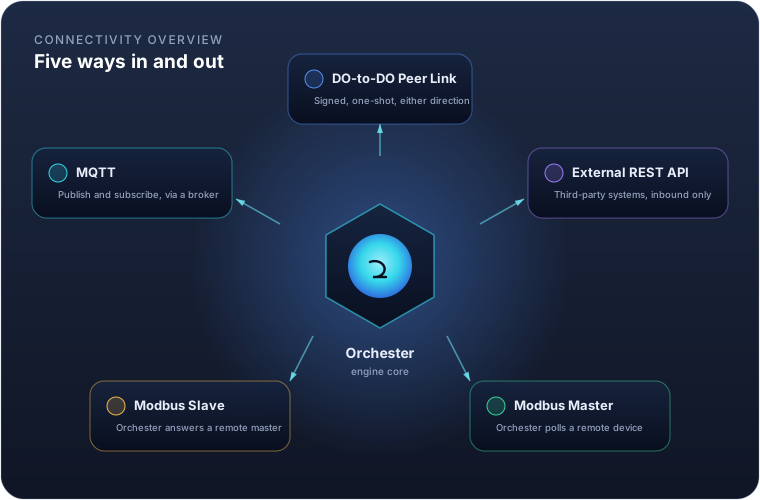
An Orchester instance rarely runs alone. It replicates to and from other instances, accepts data from third-party systems, and polls or answers industrial field devices. Five mechanisms cover all of it, and this guide walks through each: what it's for, how to configure it, and what to watch out for.
| Method | Who calls whom | Typical use |
|---|---|---|
| DO-to-DO Peer Link | Either side, signed, one-shot | Replicating variables or history between two Orchester instances |
| External REST API | External system calls in | A third-party system pushing data into Orchester |
| Modbus Master | Orchester polls out | Reading from and writing to a PLC, meter or drive |
| Modbus Slave | A remote master calls in | Exposing Orchester's own variables to a SCADA/HMI |
| MQTT | Orchester dials a broker | Publishing telemetry and subscribing to commands |
DO-to-DO Peer Link
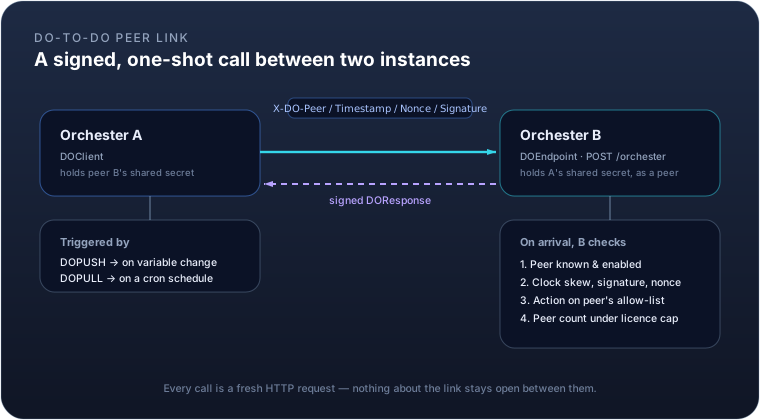
Two Orchester instances talk to each other through a single, generic endpoint: POST /orchester. Every call
carries one action — variables.push, variables.get, variables.set, script.execute, logger.head,
logger.append, or a ping — in a signed envelope, and gets a signed reply. There is no persistent connection:
each call opens a fresh HTTP request and closes it once the response arrives.
The request is authenticated with four headers — X-DO-Peer, X-DO-Timestamp, X-DO-Nonce,
X-DO-Signature — built from an HMAC-SHA256 signature over the method, path, peer code, timestamp, nonce and a
hash of the body, using a secret both sides already share. A nonce cache rejects any request replayed inside
the clock-skew window, and repeated authentication failures from the same source trip a rate limit.
You don't configure this exchange directly — you configure the peer it runs against, and the modules that use it:
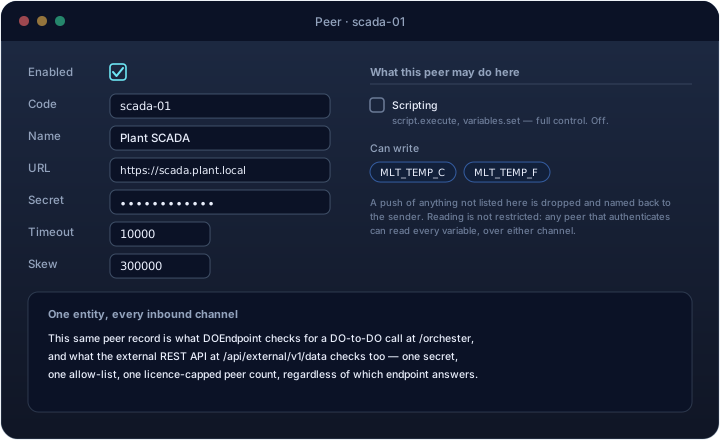
| Field | Meaning |
|---|---|
enabled |
Whether this peer is usable at all |
code |
The identity the far side signs with |
url |
Where to reach the peer — only needed if this instance calls out to it |
secret |
The shared HMAC key, or env:VAR_NAME to read it from an environment variable instead |
timeout |
How long an outbound call waits before giving up (ms) |
skew |
Maximum allowed clock drift between the two sides (ms), default 5 minutes |
writables |
The variables this peer may write here with variables.push. Empty means none: a peer saved without a list is a misconfiguration, not a superuser |
scripting |
Whether this peer may run AScript here (script.execute, variables.set). That is full control of the instance — off by default, and granted only to a peer you trust completely |
Two modules ride on top of a peer: DOPUSH sends variables.push whenever a watched variable changes;
DOPULL calls variables.get on a cron schedule. Both point at the same peer entity, so the URL, secret and
permissions only need to be set once no matter how many modules use that link.
[!IMPORTANT] A peer's permissions cover writing and scripting only. Every other action is open to any peer that authenticates: it can read any variable with
variables.get, and append history rows for any variable withlogger.append. Registering a peer is therefore a decision about who may read your plant, not only who may change it — the secret is the boundary, so treat it as one.
Naming this instance
The code in a peer entity names the far side. This instance's own name is set separately, in the field at the
top of the Orchester panel's left rail, and is stored in entities/.instance.
It has to match the code of the peer entity that represents this instance on the other machine — that name
travels in the X-DO-Peer header and is how the far side knows which secret to verify your request with. An
instance that has never been named calls itself ORCHESTER and says so in its log at every start.
[!NOTE] The name does not travel in a configuration export. An archive taken from one plant and imported into another must not rename the instance that imported it — two installations answering to the same code collide replication cursors and replay caches. Set it once per installation, like the licence.
Example. Instance plant-a pushes two variable values to instance plant-b, which has granted it
variables.push:
POST /orchester HTTP/1.1
X-DO-Peer: plant-a
X-DO-Timestamp: 1755000000000
X-DO-Nonce: 7c9e6679-7425-40de-944b-e07fc1f90ae7
X-DO-Signature: 3q2+7wYAAAA9CGFP...

{"v":1,"action":"variables.push","code":"plant-a","id":"7c9e6679-7425-40de-944b-e07fc1f90ae7",
 "data":{"values":{"TEMP_C":21.4,"PUMP_RUNNING":true}}}
plant-b answers with a signed {"status":"OK","data":{"applied":2,"rejected":0,"rejectedNames":[]}}.
If plant-a's peer entity on plant-b does not list one of those variables under writables, that value is
dropped and the answer becomes PARTIAL, naming what was refused:
{"status":"PARTIAL","data":{"applied":1,"rejected":1,"rejectedNames":["PUMP_RUNNING"]}}
PARTIAL is a success, not a retry: the sender logs the refused names and does not send them again, because a
variable the far side will not accept never becomes acceptable by being sent a second time.
External REST API
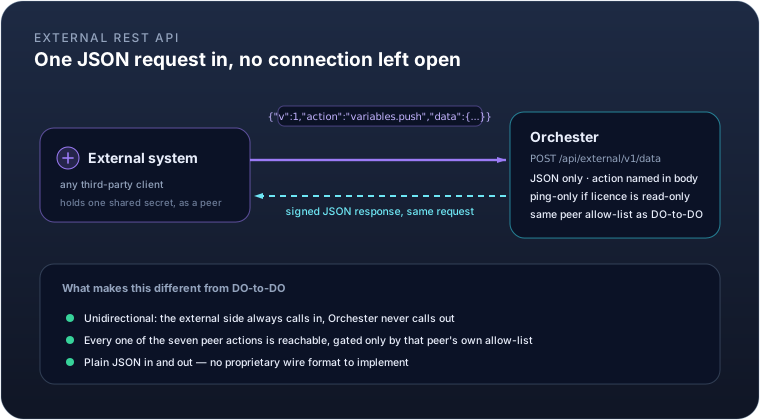
The DO-to-DO link assumes the far side is another Orchester instance, speaking the same internal wire format.
For everything else — a customer's own backend, an integration platform, a script — there's a second endpoint,
POST /api/external/v1/data, built on exactly the same peer, signing, permission and licence model, but
JSON-only and reachable by any system that can compute an HMAC-SHA256 signature.
The request shape is the same one-action-per-call envelope: a JSON body naming the action and carrying its
data, the same four X-DO-* signature headers, and the same peer permissions deciding what a given external
system may write. It's unidirectional by design — the external system always calls in, and Orchester never
calls back out to it, so there's nothing to keep open between requests.
One difference from the internal link: when this instance's licence is in a read-only state (expired, invalid,
or a tampered clock), the external endpoint answers ping only, and refuses everything else. The internal
peer-to-peer channel doesn't carry that restriction, so replication between your own instances keeps working
even while a licence issue is being sorted out — only the door held open to outside systems narrows.
Set this up exactly like a DO-to-DO peer — the same editor, the same two permissions shown above — since it's the same entity either way. List only the variables that integration actually has to write, and leave scripting off: it hands the caller full control of the instance, so reserve it for peers you trust completely. Remember that reads are not scoped — an external system you register can query every variable in the plant.
Example. An ERP system, registered as peer erp-integration with ORDERS_COMPLETED as its only writable
variable and no scripting, records a completed order count:
curl -X POST https://plant.example.com/api/external/v1/data \
  -H "Content-Type: application/json" \
  -H "X-DO-Peer: erp-integration" \
  -H "X-DO-Timestamp: 1755000000000" \
  -H "X-DO-Nonce: 3fa85f64-5717-4562-b3fc-2c963f66afa6" \
  -H "X-DO-Signature: <base64 HMAC-SHA256 over method, path, peer, timestamp, nonce and body>" \
  -d '{"v":1,"action":"variables.push","data":{"values":{"ORDER_COUNT":128}}}'
The signature is computed the same way on any platform: HMAC-SHA256 over
POST\n/api/external/v1/data\n<peer>\n<timestamp>\n<nonce>\n<sha256 of the body>, using the peer's shared
secret — there's no DataOrchester-specific SDK required, just a standard crypto library.
Modbus Master
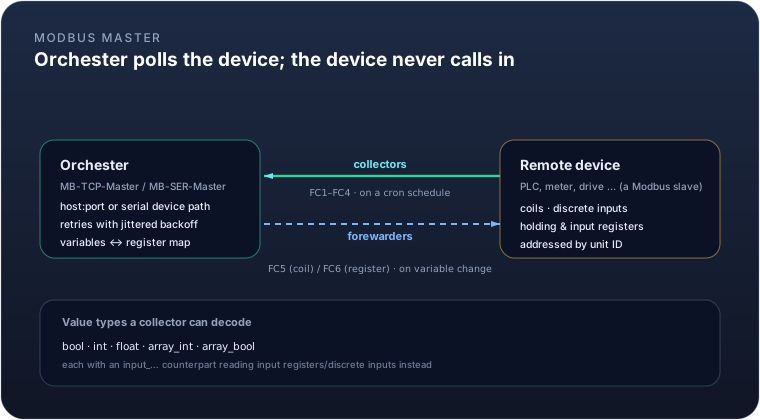
As a Modbus master, Orchester is the one opening the connection — to a PLC, a power meter, a variable-speed
drive, anything that answers Modbus requests. Two module types exist: MB-TCP-Master for Modbus TCP, and
MB-SER-Master for serial RTU over an RS-485/RS-232 line, each configured with the reachability details for
that transport (host/port for TCP; serial device, baud rate, parity and stop bits for RTU) plus a default unit
ID.
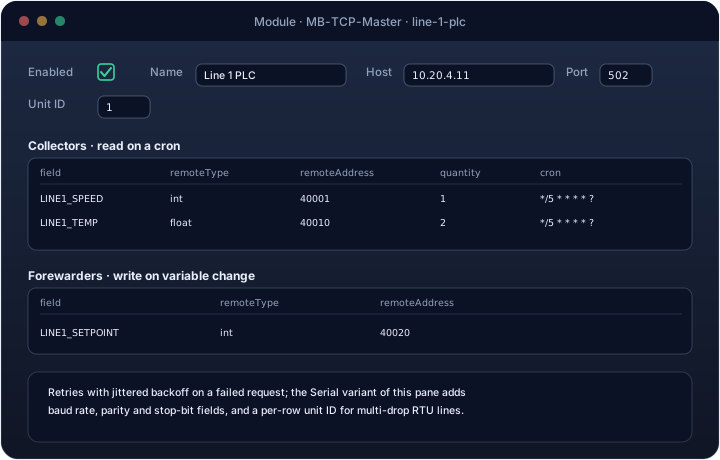
Reading and writing are configured as two independent lists:
- Collectors read from the device on a cron schedule and land the result in a variable. Each row names the
variable, the remote address, and a
remoteTypetelling the module how to decode it:bool/input_bool(coil / discrete input, one bit),int/input_floatand friends (one or two holding/input registers, reassembled into an integer or IEEE-754 float), or anarray_*variant readingquantitywords or coils at once. - Forewarders write to the device whenever their variable changes. The write side is narrower than the
read side — only
bool(a single coil, function code 5) andint(a single register, function code 6) are supported.
Every request retries with a jittered backoff on failure rather than giving up on the first dropped packet or timeout, which matters on a noisy serial line shared by several devices.
Example. Reading a line's temperature (a 32-bit float split across two holding registers) every ten seconds, and writing an operator-adjustable setpoint back when it changes:
Collector    field=LINE1_TEMP_C   remoteType=float  remoteAddress=40010  cron=*/10 * * * * ?
Forewarder   field=LINE1_SETPOINT remoteType=int    remoteAddress=40020
LINE1_TEMP_C now updates itself every ten seconds from the device; writing to LINE1_SETPOINT anywhere in
Orchester — a dashboard, a formula, another peer — sends function code 6 to register 40020 on the PLC.
Modbus Slave
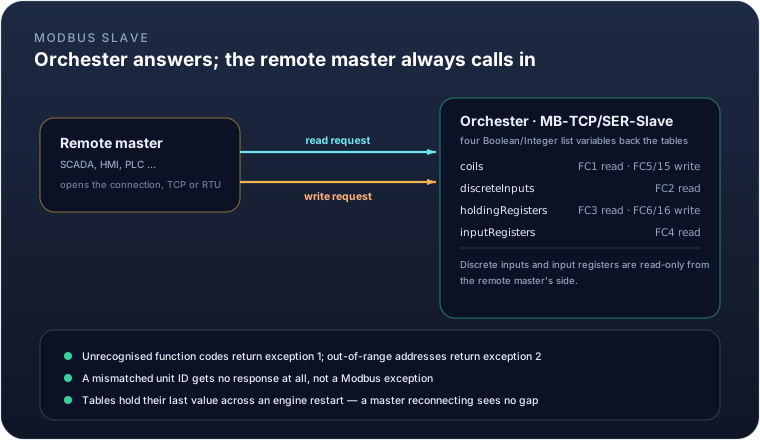
Flip the direction, and Orchester becomes the thing being polled: MB-TCP-Slave and MB-SER-Slave turn an
instance into a Modbus server that a SCADA system, an HMI, or another PLC can read from and write to. Four
list-valued variables back the four Modbus tables:
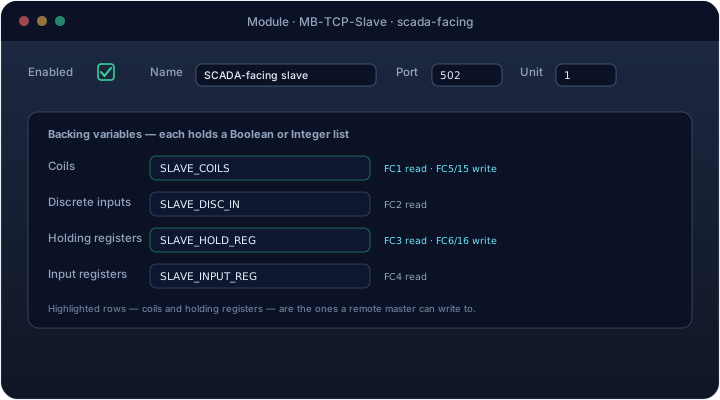
| Table | Backing variable holds | Function codes |
|---|---|---|
| Coils | List<Boolean> |
FC1 read, FC5/FC15 write |
| Discrete inputs | List<Boolean> |
FC2 read |
| Holding registers | List<Integer> |
FC3 read, FC6/FC16 write |
| Input registers | List<Integer> |
FC4 read |
Discrete inputs and input registers are read-only from the remote master's side — only coils and holding registers accept writes, matching their table names.
An unsupported function code comes back as Modbus exception 1; an out-of-range address or a request past the
end of the backing list comes back as exception 2. A request tagged with a unit ID that doesn't match this
slave's configured unit gets no response at all, rather than an exception — indistinguishable, on the wire,
from the slave not existing. And because these are ordinary Orchester variables, they hold their last written
value across an engine restart, so a master reconnecting after a deploy sees continuity, not a gap.
Example. Exposing eight alarm bits and four analog readings to a plant SCADA, unit ID 3:
coils            -> SLAVE_COILS      (List<Boolean>, length 8)
holdingRegisters -> SLAVE_HOLD_REG   (List<Integer>, length 4)
The SCADA reads FC3 at address 2, quantity 1, and gets SLAVE_HOLD_REG[2]. If it writes FC5 to coil 3 to force
an alarm, that write lands in SLAVE_COILS[3], exactly as the table above suggests.
MQTT
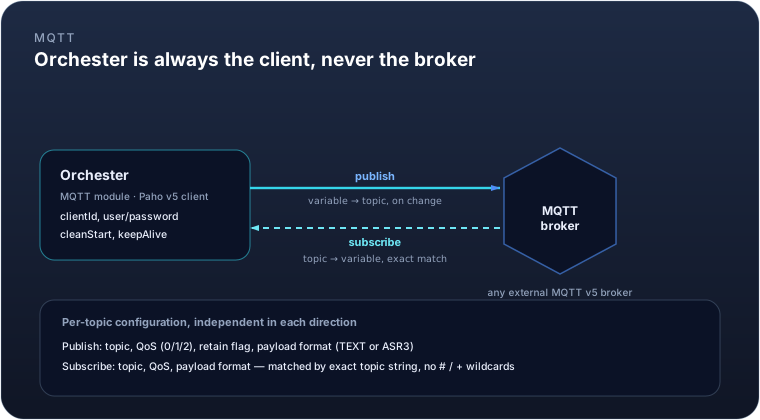
The MQTT module makes Orchester an MQTT v5 client — never a broker. It opens one connection to an external
broker and, independently in each direction, publishes variable values out to topics and subscribes to topics
that update variables.
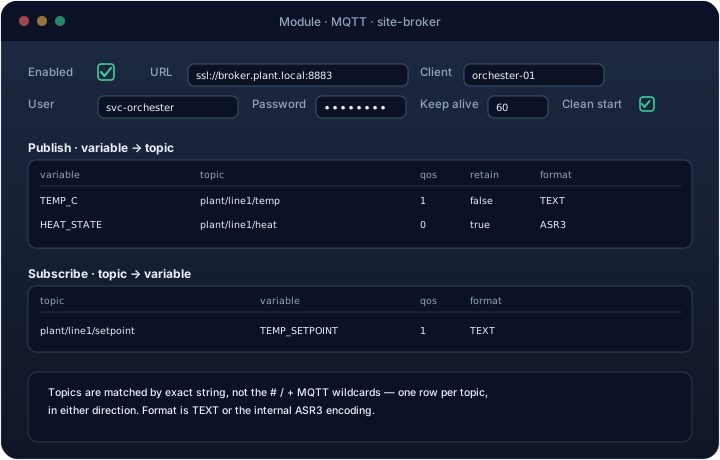
| Field | Meaning |
|---|---|
url |
Broker address, including scheme (tcp:// or ssl://) and port |
client |
The MQTT client ID this instance presents |
user / password |
Broker credentials, if required |
cleanStart |
Whether to start a fresh session on connect (default on) |
keepAlive |
Keep-alive interval in seconds (default 60) |
Publish and subscribe are both configured as maps, one row per topic:
- Publish: variable to topic, with a QoS level, a retain flag, and a payload format — plain
TEXTor the internalASR3encoding, which round-trips richer types than a plain string can. - Subscribe: topic to variable, with the same QoS and format choice.
Topic matching is an exact string comparison — there's no #/+ wildcard support, so a subscription needs one
row per concrete topic it should react to.
Example. A line records its power draw in the POWER_KW variable and needs it visible to a plant-wide
dashboard subscribed to the site broker, while a remote setpoint arrives over the same broker:
Publish     POWER_KW -> plant/line1/power        QoS 1  retain=false  format=TEXT
Subscribe   plant/line1/setpoint -> TEMP_SETPOINT QoS 1  format=TEXT
Choosing between them
- Talking to another Orchester instance: use the DO-to-DO peer link — it's already there, and
DOPUSH/DOPULLcover the common push/pull patterns without any custom code. - Talking to a third-party system that can call you: use the external REST API. It reuses the same peer and licence model as DO-to-DO, so a customer's integration is one more peer entity, not a new trust boundary.
- Talking to a field device that speaks Modbus: use Modbus Master if Orchester should poll the device, or Modbus Slave if the device (or a SCADA layer above it) needs to poll Orchester instead. Both can run at once for the same device family, if some points are read there and others are written here.
- Talking to a message broker, or integrating with anything already built around publish/subscribe: use the MQTT module.
All five share the same underlying safety property: none of them can be configured into pulling more than a licensed instance is entitled to, and none of them de-energizes a running engine on their own — a licence issue narrows what a peer or the external API will answer, it never stops a module that's already driving a device.