
Some modules never talk to the outside world. They work on the variables inside an instance, doing what a formula cannot. This guide covers them: what each one is for, how to configure it, and what to watch out for.
| Module | What it does | Typical use |
|---|---|---|
| Merger | Writes to one output the value of whichever input changed last, when a filter accepts it | A setpoint written from several places; redundant meters; the latest of several messages |
Merger
A formula recomputes from all of the variables it reads whenever one of them changes, but it never learns which one
changed. "Take the value of whichever input changed last" therefore cannot be written as a formula. The MERGER
module does exactly that: the engine tells it which of its inputs changed, it asks its filter about the new value,
and when the filter accepts it, the value is written to the output.
| Setting | Meaning |
|---|---|
| Inputs | The variables whose changes the merger takes |
| Filter | An expression that decides whether a change is taken. Empty means every change is taken |
| Output | The variable that receives the accepted values |
The filter
While the filter runs, the new value of the input that changed is available as _VALUE_. Every other variable is
read by its own code, the output included, so a filter can compare the new value with the current output or depend
on a mode variable.
| The filter returns | What happens |
|---|---|
true |
The value is written to the output |
false, or no value |
Nothing is written |
| Anything else | Nothing is written, and a warning is logged |
| An error | Nothing is written, and a warning is logged |
A filter that reads a variable which has never held a value fails, as a formula would. Give such a variable an initial value.
Rules
- Every change is evaluated. Each change the engine reports for an input runs the filter once. A Modbus slave that rewrites a register with the value it already held is reported too; writing that same value to the output changes nothing further.
- The last accepted change wins. Changes are handled on the thread that reports them. Two inputs that change at the same instant from different sources, for example a panel and a Modbus poll, may reach the output in either order.
- Nothing is written at start. The output keeps its value (persistent or initial) until the first accepted change.
- The output keeps its type. An accepted value is converted to the output's declared type. A value that cannot be converted is not written, and a warning names it.
- Only the inputs run the merger. A change to a variable the filter reads, but which is not an input, does not run it.
Messages
A merger logs its problems as [name][LEVEL][CODE] text, once when a problem first appears and again only when its
text changes. After a warning, the next change handled without a problem logs [name][INFO][RECOVERED] Recovered.
All texts are in English.
| When | Level | Text |
|---|---|---|
| Start: the merger does not run | ERROR |
No inputs |
ERROR |
No output |
|
ERROR |
Input {input} is not a variable |
|
ERROR |
Output {output} is not a variable |
|
ERROR |
Filter does not compile: {reason} |
|
| Start: the merger runs | WARNING |
Variable _VALUE_ has the name of the bound value, so the filter cannot read it |
WARNING |
Input {input} ({type}) cannot be assigned to output {output} ({type}) |
|
| While running | WARNING |
Filter failed for {input}: {reason} |
WARNING |
Filter returned {type}, not a boolean |
|
WARNING |
Output {output} refused {value}: {reason} |
|
WARNING |
Writing output {output} failed: {reason} |
|
WARNING |
Processing {input} failed: {reason} |
A merger that cannot run never stops the engine: the other modules start as usual.
[!WARNING] A merger has no loop protection. A loop that writes the same value back ends by itself, because an unchanged value goes no further. A loop that changes the value on the way, such as a formula
SP + 1feeding one of the merger's own inputs, never ends. Check that the output does not lead back to an input.
Also keep in mind:
- Renaming. When an import renames variables, the inputs, the output and the names the filter reads follow the
rename. A code written inside quotes in the filter, such as
"SP_LIT_301_HMI", is text and is not renamed. - List inputs. Use inputs that hold single values. A Modbus slave's register bank is one list that the slave
changes in place, so once written to the output, the output holds that same list. Read the register you need
through a formula, such as
HR[0], and use the formula as the input.
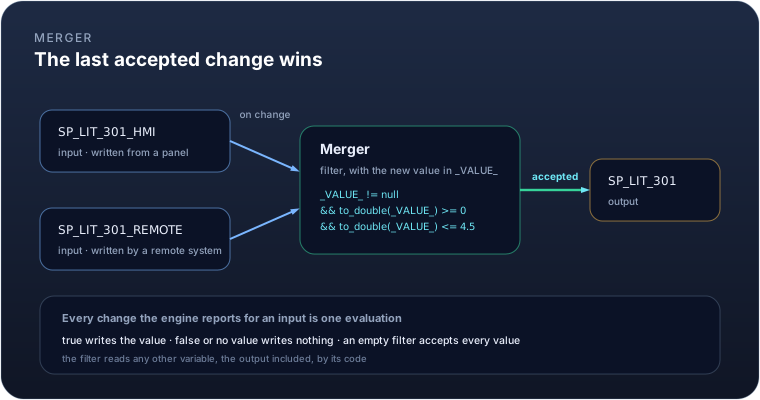
Example. A level setpoint written from a panel and by a remote system, taken only when it is within the tank's limits:
Inputs   SP_LIT_301_HMI, SP_LIT_301_REMOTE
Filter   _VALUE_ != null && to_double(_VALUE_) >= 0 && to_double(_VALUE_) <= 4.5
Output   SP_LIT_301
Writing 2.0 from the panel sets SP_LIT_301 to 2.0. A remote 5.0 is out of range and changes nothing; a remote 3.5
then sets it to 3.5.
Example. Two redundant flow meters, keeping only plausible readings:
Inputs   FIT_501_A, FIT_501_B
Filter   _VALUE_ != null && to_double(_VALUE_) >= 0 && to_double(_VALUE_) < 500
Output   FIT_501
Example. The latest error from several modules, ignoring a message that was cleared:
Inputs   PLC1_ERROR, MQTT_ERROR, PUSH_ERROR
Filter   _VALUE_ != null && _VALUE_ != ""
Output   LAST_MODULE_ERROR
Example. A pump command from a local switch or from MQTT, where the last one given wins:
Inputs   CMD_LOCAL, CMD_MQTT
Filter   (empty)
Output   CMD_PUMP_1